Your account starts with a callsign, a balance and the airport you chose. You are always at one airport: where you started, and after that wherever your last flight ended.
Set your simulator and units in your profile. Only aircraft that exist for your simulator are offered to you.
Add your SimBrief pilot ID to your profile so flight plans go back and forth by themselves. VATSIM and IVAO IDs are optional and enable the Prefile buttons.
You do not need to own an aircraft or have money to begin: public aircraft wait at every airport.
2Finding an aircraft to fly
A charter from the board pays by the class of aircraft you fly it in, as a client pays more for a jet: the pay shown is for the aircraft you have selected. A piston or turboprop gets the base pay; a light jet 1.4 times it, a midsize jet 1.8, a large jet 2.3 and a bizliner 2.8. Contracts, ferries and your own charters keep their own pay.
Public aircraft are rented by the hour flown. The ones parked at your airport are listed under the charters on the Charters page, with range, seats, runway needed, condition and hourly rate.
To fly one particular type you own in the simulator, use the Search by aircraft box on the Charters page: type its name, pick it, and you get every airport that has one free, nearest first, with the charters waiting there. Travel there and its charters are on your board.
Every airport page lists the charters leaving from it and the aircraft to rent there.
A charter that leaves from another airport: use Look at another airport on the Charters page. It opens the charter board of that airport, for the aircraft to rent there, with a button to travel to it.
The aircraft loaded in the simulator must be the type you booked. The tracker checks it; a different aircraft holds the report for review.
Rental is charged only when the flight lands at an airport. A cancelled flight costs nothing and the aircraft goes back where it was. Fuel is included in the rental of a public aircraft. A pilot's own aircraft may be rented out dry: then you pay the fuel you load, and the charter says so.
Free flight: no charter needed. Open Flights, Free flight: it lists the aircraft at your airport, your own elsewhere and any type at other airports (with a trip there); or press Free flight beside an aircraft on the Charters page. It is not a charter and not paid work: you pay every cost. Touch-and-goes are counted as landings, with one landing fee. Fly where you like, to move the aircraft, to practise or to look around, and land at any airport: the flight ends there and you and the aircraft stay there. Nothing is paid; the rental (fuel included), crew and the fees where you land come off your account, so it must cover at least an hour. Its hours count in your career; achievements do not.
Public aircraft move on to other airports by themselves and wear with use. One below 60% condition is grounded until it has been through maintenance.
Bigger airports keep more aircraft to rent and more ferries, and of the sizes that use them: turboprops and jets at a large international airport, every size at a medium one, pistons and turboprops at a small field. Any other type can still be found with Search by aircraft and brought to you.
A public aircraft you have flown on two or more flights stays where you left it for a week after your last one: the fleet does not move it elsewhere meanwhile, though another pilot at that airport may still rent it.
3Choosing a charter
The board lists the flights the selected aircraft can make from where it is parked: passengers, cargo or medical. Change the aircraft at the top to see what another one can reach.
Click a charter to see the route on a map, the client, distance, estimated time, pay and how long you have to fly it. Urgent charters pay 20% more and must be flown within 24 hours.
Every charter says who is hiring: a company, a family or a hospital with a name. Its details show your record with them and how other pilots' flights for them went, so you can judge the work before taking it.
A passenger charter shows the service its client expects: economy, executive or luxury. Its details list other aircraft of your simulator that can fly it, with the time and what the aircraft and crew would cost, those that suit the service first. It is advice: any aircraft that fits may fly it.
One flight at a time. Book it, fly it or cancel it before taking another.
A charter beyond the range of the aircraft can still be flown, in legs: tick "Include longer charters that need fuel stops" and choose each stop on the flight page.
Every board also offers one or two long trips past the aircraft's range, planned through technical stops (Gander, Keflavik, the Azores and the like) that every leg of your aircraft reaches: ocean crossings, among others. They pay well above a normal charter, more for every stop after the first, with each stop's fees and crew time covered. Booked, the first leg is set to the first stop; after each stop's report the next leg is set for you.
Map of all destinations, above the list, shows every charter on offer on one map: the place, the distance and the pay, with Details to open it. A destination with scenery for your simulator shows a download (free) or cart (payware) icon that takes you to it.
A charter that leaves from another airport shows the fare to travel there as a passenger.
Chain up to five charters, each leaving from where the one before lands, and fly them in order: see Chaining charters.
Bookings, in the top bar, holds everything you have booked: the flight booked or flying, your chain of charters, your custom charters on sale, sold or with the AI crew, the flights another pilot or the AI crew fly for you, and the reports waiting for review. Create custom charter starts there too. The Charters page is for finding a charter; flights already flown are in the Logbook.
Create custom charter: take a free flight (see Finding an aircraft to fly), or put seats and cargo space up for sale on your own route: see Selling seats and cargo.
4Selling seats and cargo
Create custom charter, Put it up for sale: choose the aircraft, any route, and what you sell: passengers, cargo, or both, as much as the aircraft takes.
The large public aircraft that fly only on contracts, the BBJs, the regional ATRs and the Saab 340, can have their seats and hold put up for sale too, from the airport where they are parked; one of your own can, wherever it is.
Up to five charters can be on sale or waiting to fly at once, each holding its aircraft, and you keep flying other flights meanwhile. They all appear in Bookings (in the top bar), under My charters, each with a bar of how it is selling and the time left. If one uses a public aircraft, the others use that same one, or one of your own.
Set your price: a fare per seat, and a price per pound of cargo. Passengers' bags ride free; only what is sold as cargo is paid by the pound. Leave a price empty to sell at the market price, which the form shows as you type.
Every sale runs 12 hours, or 2 if you tick Expedite selling: a charter that has to leave, where people book faster though fewer than in a full sale. Every few minutes each free seat, and each 50 lb parcel of cargo, may be booked, each on its own, so a big aircraft fills as fast as a small one. A fair or low price sells faster and fuller; a dear one draws few. A big or popular destination draws more, and so does its season: its summer, the tropics while the north has its winter, and the December holidays. A cold place in its winter draws less. Passengers prefer a jet, a hop or a very long trip draws fewer, and storms or heavy rain at either end slow bookings.
Your own sales agent, always the same person, writes to you as people book, at most once an hour, and tells you how it goes: a price too high or low against the market, a destination in or out of favour, a sale ahead of or behind the clock. If nothing has sold a third of the way in, they write on their own.
You can change the price while the sale is on, from My charters. People still deciding weigh the new price; those already booked keep the price they took.
Close the sale whenever you like; otherwise it closes by itself at the end of its time. Then press Fly it, with you and the aircraft at the departure airport, and the flight is yours to dispatch.
Once sold, leave within a day. Later than that, passengers start to cancel, more every hour, and your agent writes. You can still fly it, drop it at no cost, or put it back on sale for a fee to fill the empty places again. Left three days, it is dropped by itself. Nobody booked? Drop it, or put it back on sale.
Sold charters waiting are spaced a day apart: 24 hours to leave on the first, 48 on the second, 72 on the third. Running late on one? Push it back 24 hours once from My charters: the passengers wait, and you pay a penalty of 6% of what was sold (at least $100).
The flight pays every seat sold at its fare and every pound booked at its price; rental, fuel, crew and fees come off as on any flight. A full aircraft beats a board charter; a half-empty one does not.
Sold, but someone else should fly it? In My charters, Hire a pilot offers it on the board as Pilots wanted, in your aircraft, for 30 to 60% of what was sold. The pilot who takes it is paid that share and the cabin bonus; you keep the rest and pay fuel, crew, fees and any rental as the operator. Take it back while nobody has taken it. If nobody has six hours before it must leave, you hear.
Or let the AI crew fly it: it charges more than any pilot of the network, 65% of what was sold (or three times its crew's cost on a long flight that sold little), and you pay fuel, fees and any rental too. It also needs time to get a crew to the airport: from 30 minutes on a short turboprop hop to three hours across an ocean. The aircraft is away for the flight and lands at the destination with the hours and wear on it; you are paid and charged when it lands. Flying it yourself, or handing it to a pilot, pays better.
Any charter you have booked can go the same way before you start it: on the flight page, Have someone else fly it offers it to pilots of the network or gives it to the AI crew, in the aircraft you booked, with its pay counting as what was sold. You are free to fly something else, and earn no hours or landing bonus from it. The AI crew flies direct, so not beyond the aircraft's range; ferries and free flights stay with you.
5Chaining charters
Line up to five charters from the board and fly them one after the other. The first leaves from where you are, or from where the flight in hand lands; each next one has to leave from the airport where the one before lands.
Open a charter on the board and press Add to my chain. My chain, in Bookings, lists them in order with what they pay in total. Add the next leg opens the board of the airport where your chain ends.
Charters in your chain are kept for you: no other pilot sees them. Dispatch the first from My chain in Bookings, from your dashboard or from the phone app, in an aircraft standing at its airport. Once booked it leaves the chain and the next one is first.
A charter that expires before you fly it drops out of the chain by itself. Removing one also removes the ones after it, since they left from where it landed; they go back on the board.
Map of the chain shows every leg on one map, numbered in the order you fly them.
6Dispatch: planning the flight
On the flight page, Generate in SimBrief opens SimBrief with the aircraft, passengers, cargo and crew weight already filled in. Finish the plan there and come back: the portal picks it up.
On a short leg the portal asks SimBrief for a cruise altitude that fits the distance. You can set your own altitude, route and alternate and generate again.
No SimBrief? Press Dispatch without SimBrief on the flight page: the portal works out the fuel (the leg at cruise, taxi and climb, 45 minutes of reserve and, where the destination sells none, the hop to a field that does) and the flight is ready for Start flight. Or type the departure fuel by hand. The tracker loads that fuel and the passengers and cargo of the manifest.
The Prefile buttons send the plan to VATSIM or IVAO when you fly online.
With your VATSIM ID in your profile, the tracker and your phone tell you within a minute or two when a controller comes online where you are flying, with the frequency, once a flight. It is a reminder: your pilot client still has the last word. Sector boundaries from the VATSpy Data Project (CC BY-SA 4.0).
Dispatch again clears the SimBrief plan on the flight page so you can generate a new one: the weather changed, the fuel, or the load.
Too heavy to take everything? Before departure, leave cargo on the ground (its pay is lost and 25% of it is charged as a penalty) or passengers (their fare is lost and the same again is charged). Then dispatch again for the lighter load.
7The tracker: flying the flight
vJetOps Tracker is a Windows program that runs beside the simulator. It only watches the flight: it never moves a switch on your aircraft.
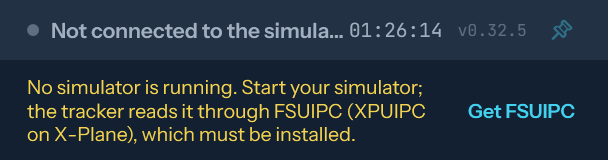
It reads the simulator through FSUIPC (FSUIPC7 for Microsoft Flight Simulator, the free version is enough; XPUIPC for X-Plane). With no connection, the tracker says which piece is missing and gives a link to download it.
When a newer tracker is out, a bar at the top says so: Update now downloads it and restarts the tracker by itself.
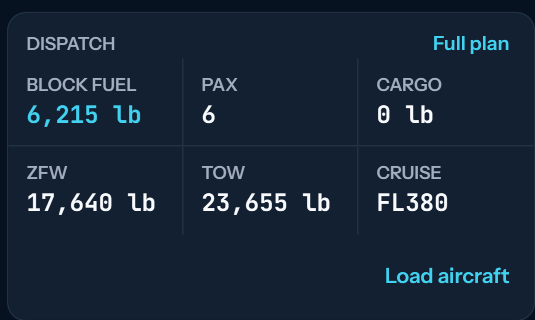
Sign in with your portal email and password. With the simulator at the departure airport and the right aircraft loaded, press Load aircraft: fuel and payload are set as dispatched and turn green.
In Microsoft Flight Simulator 2020 and 2024, Load aircraft also sets COM1, COM2, NAV1, NAV2 and the transponder as the last pilot left that aircraft. Frequencies go in 25 kHz steps, and an aircraft with its own radio logic may ignore them.
Some aircraft load only from their own EFB. The tracker says so: load from the EFB with the same SimBrief plan and the figures turn green when they match.
Press Start flight, fly, land, park with the parking brake set and press Submit flight. Keep the tracker open the whole time.
The tracker opens on the Dispatch tab, to plan and load; it moves to the Flight tab when you press Start flight. A new flight opens on Dispatch again.
Small piston aircraft (a Skyhawk, a Baron and the like) are not loaded with the plan's minimum: the tracker fills their tanks as far as the maximum takeoff weight allows with everyone and everything aboard, read from the aircraft itself, and never past it. Fuel you set by hand on the portal is loaded as set.
In X-Plane you set the fuel yourself in its Fuel & Weight menu: at least what the plan asks, and no more than the tracker says fits. An aircraft with its own load screen, as many paid add-ons have, ignores that menu: set fuel, passengers and cargo there, and the tracker reads them. Your tanks need not be full. Bound for an airport that sells no fuel, we recommend carrying more than usual.
If the tracker or the simulator closes or hangs in flight, open the tracker again: it picks the flight up where it was. If it goes quiet for a while, you get an email on how to carry on.
If the tracker stays silent for six hours, once the flight could have landed, the flight is closed from its track if the aircraft stopped at its destination, or else cancelled with nothing paid and no reputation lost. You hear of it by email and in your Inbox.
Landed but the report never reached the portal? Once the aircraft is stopped at its destination, Close the flight appears on the flight page: the flight is closed from the track recorded, judged like any report. It is never offered anywhere else.
With Microsoft Flight Simulator 2020 or 2024 the tracker also reads the weather at the aircraft through SimConnect: cloud, rain or snow and how hard, and ice on the airframe. The Flight tab shows it under satisfaction. Nothing to install.
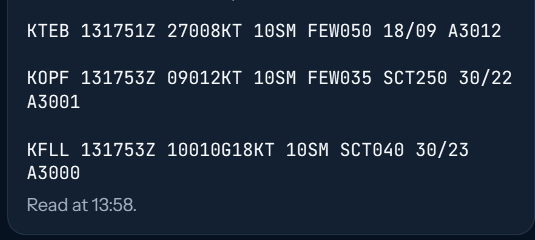
On the Dispatch tab, Get METAR shows the latest weather report for your destination and your alternate. Refresh asks again.
Landing lights: off as you climb through 18,000 ft and on as you descend through it, the transition altitude in the Americas (10,000 ft would be too low for a field like Mexico City, at 7,300 ft). The tracker looks once each way, with 1,000 ft of margin: above 19,000 ft climbing and below 17,000 ft descending. A miss raises an alert and costs reputation. Unpressurised turboprops (Caravan, Kodiak, Twin Otter, Skyvan and the like) are checked at 10,000 ft instead. Piston aircraft, and any flight that never climbs past the line, are not checked.
Pausing the simulator pauses the tracker: paused time is not flight time and nothing is judged meanwhile. More than 15 minutes paused in the air holds the report for review.
With Discord open on the same PC, your flight shows on your Discord profile: route, aircraft, phase and distance to go.
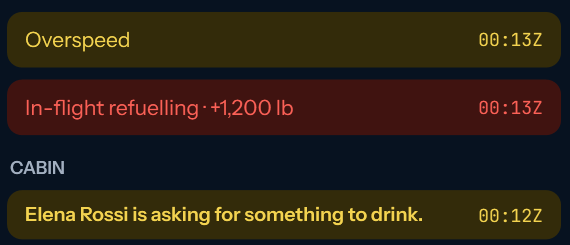
Time acceleration, slew, refuelling in the air, long pauses, overspeed, stall and a crash raise alerts. Some of them hold the report for an admin to review before it is paid. A flight flown with time acceleration is paid only a third.
Overspeed is the simulator's own warning, raised at the limit the aircraft (or the add-on) has inside it: vJetOps sets no speed of its own, and an add-on's limit can differ from the marks on the airspeed indicator. While it lasts the passengers lose satisfaction every second, and the tracker chimes and tells you the speed. Slow down until it stops.
No connection: the tracker says what is missing and where to get it.A newer version is out: Update now installs it.Dispatch tab: the plan, and Load aircraft to set fuel and payload.Dispatch tab, further down: the latest METAR for destination and alternate.Alerts tab: what the flight raised, and below it everything the cabin did and asked for.
8Passengers and satisfaction
Every passenger has a name and reacts to how you fly: steep turns, hard jolts and fast descents cost satisfaction. A hard landing is a fright: 20 points at 500 fpm, 35 past 700 fpm. A smooth flight wins it back slowly.
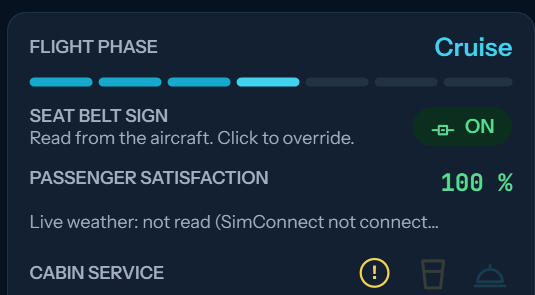
Seat belt sign: on for takeoff and landing. In a calm cruise turn it off; left on for twenty minutes with smooth air, the cabin gets tired of it.
With the sign off, passengers get up. A jolt with someone on their feet throws them down. Turn the sign on before rough air.
On jets and larger turboprops passengers ask for a drink after half an hour and a meal on long flights. Send cabin service from the tracker with the glass (drinks) and covered dish (meal) buttons; it only goes round with the sign off, and takes longer the more passengers there are. From 22:00 to 06:00 on the simulator's clock the cabin sleeps: nobody asks for anything, no service goes round and hardly anybody gets up; they ask when they wake. Turbulence or rough handling wakes them, and that costs satisfaction.
Smaller aircraft with no galley (the Caravan, Kodiak and other turboprops, and pistons of four seats or more) carry a basket of water and snacks instead. On a flight of more than about 40 minutes the passengers ask for it, then again every two hours; hand it round with the glass button, with the sign off. It costs $8 a passenger and counts for less than a jet's service, either way.
A yellow mark beside those buttons means the cabin is waiting for something from you: hover over it to read what. Everything passengers do and say during the flight is listed under Alerts.
Delays on the ground wear on the cabin: more than 20 minutes from Start flight to takeoff, or more than 15 from landing to parked, and satisfaction falls by the minute. A late departure can be made up for in smooth air; a slow taxi in cannot.
Storms, rain, fog and gusts at the departure or arrival airport make the cabin uneasy. That is taken from the real weather report of the airport.
The cabin also feels hard braking on the ground, fast turns while taxiing, turbulence (light chop only counts in cloud or rain), a bounced landing, an engine stopping in flight, a go-around (less in bad weather), a downpour or a storm, and ice on the wings. Turbulence and storms with the seat belt sign off cost twice.
In aircraft with no pressurised cabin (most pistons, helicopters and turboprops like the Caravan or Kodiak), only a real dive hurts the passengers' ears: steeper than 1,500 fpm and kept up for 20 seconds. Flying above 12,500 ft for more than half an hour, or above 14,000 ft at all, leaves them short of oxygen.
In the PMDG 737 BBJ and BBJ2 (MSFS, with the PMDG SDK on), the passengers feel the cabin itself. Temperature: board in the heat with the packs off and no APU and the cabin is hot from the start; with a pack running and air to feed it (engines or the APU bleed) it is back to 22 °C within about three minutes; packs off in flight let it turn cold. The cabin\x27s own climb and descent, not the aircraft\x27s, hurt the ears; a cabin above 8,500 ft leaves people short of breath, and the CABIN ALTITUDE warning is serious. A door open while moving frightens everyone. Milder: a dark cabin on the ground with no APU or ground power, the NO SMOKING sign off in flight, and the speedbrakes out for more than a minute.
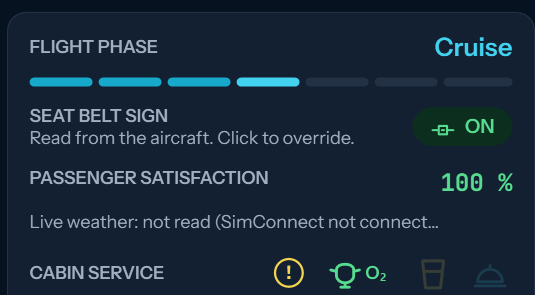
Aircraft that carry supplemental oxygen for the cabin (Bonanza, Baron, Cirrus SR22, Turbo Stationair, Caravan, Kodiak and others) show an oxygen button (O₂) beside the cabin service. Turn it on before climbing above 12,500 ft and the passengers breathe normally up high; the yellow mark reminds you if you forget.
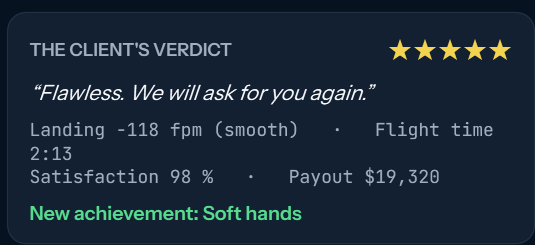
At the end the client rates the flight from one to five stars and says why.
Flight tab: the seat belt sign (click it to set it yourself), satisfaction right now, and cabin service. The yellow mark means the cabin is waiting for something; the glass sends drinks and the covered dish the meal.In an unpressurised aircraft that carries it, the oxygen button (O₂) beside the cabin service turns the supplemental oxygen on and off. Green while it is on.After Submit flight: the stars, what the client said, the landing and the pay.
9What a flight pays and costs
Pay: the charter price, plus 10% for a landing of 200 fpm or less and 5% for satisfaction of 95% or more. A hard landing or an unhappy cabin takes pay away.
Fuel has a world price that moves every Monday, up or down, and Jet A and 100LL move together. Each country adds its own difference: the Gulf sells jet fuel cheap, Europe and the islands charge more, and avgas is dear outside North America. Every airport page shows this week's price there.
Costs taken off when the flight ends: rental (public aircraft), fuel (your own aircraft), crew for aircraft that need more than one pilot, and landing and handling fees by airport size.
On the BBJs and heavy jets a crew flies up to 8 hours, then rests 8. The flight that takes it past that also pays a relief crew for all of its hours, a single flight over 8 hours included. The flight page shows the crew's hours.
Finance lists every flight with what it earned and what it cost, and every movement of your account.
Reputation goes up with good landings and clean flights, goes down with alerts such as overspeed, stall or landing lights left wrong at 18,000 ft, and matters to the bank.
10Ferry flights
A ferry moves an empty aircraft for its owner: a delivery from the factory, a sale, a lease return. The aircraft comes with the job, there is no rental, and the client pays the fuel and the airport fees.
No deadline. Fly it in as many legs as you like; each leg pays for the miles it brought the aircraft closer, and the last one adds a delivery bonus.
You can leave a ferry part of the way and another pilot can carry on from there.
Search by airport or by aircraft type. Offers come and go: one nobody takes is withdrawn and another appears somewhere else.
11Contracts for airliner-size jets
BBJs and ACJs cost too much by the hour to rent for an ordinary charter, so they fly only on contracts made for them, listed under the charters at your airport.
The regional ATRs (72-600, 72-600F freighter, 42-600 and the short-field 42-600S) and the Saab 340B (34 seats), Microsoft Flight Simulator 2020 and 2024 only, also fly on contracts: a group of 17 to 70 passengers travelling together, or a freighter hold full of cargo. The Highline versions have their own premium cabin with fewer seats (72: 26, 42: 18) and are separate aircraft here: fly the one you booked.
A contract pays the ordinary rate plus the cost of the aircraft and crew with a margin on top. The table shows the pay, the cost and what you keep.
If you own one, it gets contracts of its own that only you can take, and you keep more because you pay no rental.
12Buying and owning an aircraft
Finance, Buy aircraft: type the aircraft and pick it. You see the new one at the factory and every used one for sale, with where it is, its hours, condition and price.
A new aircraft is collected at its factory airport, with empty tanks. A used one is cheaper, carries hours and wear, and is flown from the airport where it stands.
Prices follow a market that moves every day.
To sell one, open it in the hangar. Sell to a pilot: ask a price between what the bank pays and the factory price; other pilots see it under Used aircraft (From pilots) and buy it where it stands, with its registration, hours and logbook. It stays yours and flies as usual until then, and you get the price less a 3% broker fee. Sell to the bank: at once, but for about half its value.
Your own aircraft pays no rental, but you pay its fuel and its maintenance. It stays where you leave it, and keeps the fuel it landed with.
Owning costs money even on the ground: an ownership fee of 0.4% of what the aircraft is worth, charged on the first of every month (the rest of the month when you buy it). If it takes your account below zero, your own aircraft stay on the ground until you are back above zero, and after three months in a row below zero they are sold.
The hangar shows each aircraft with its hours, fuel on board and condition, lets you add fuel and send it to maintenance, and opens its logbook.
Maintenance of your own aircraft takes one to three days, by how worn it is, and it cannot fly meanwhile. At the maker's service center it costs the base price, at another shop half again, and a mobile team flown out to wherever it stands costs two and a half times. You get an email when it goes in and when it is ready.
A landing at 500 fpm or harder means an inspection where the aircraft landed, paid by the pilot who landed it: 0.2% of the type's price, 0.5% past 700 fpm. The aircraft is out of service for two hours, three past 700 fpm. Only an aircraft worn below 60% has to go to a shop.
Below 60% your own aircraft is grounded, but it may still make one empty flight: to the service center you pick on its maintenance page. Fly it with the tracker like any flight; on landing it goes straight into the shop.
Each aircraft keeps its airframe hours and, for each engine, its hours since new and since its last overhaul. Engines run with the airframe; the tracker counts each engine on its own, so one shut down in flight runs less.
Past its time between overhauls (TBO: 2,000 hours for a piston, 3,600 for a turboprop, 3,500 to 6,000 for the jets) an engine grounds the aircraft until it is overhauled. You are told at 90% and when it is due. Overhaul one engine or all of them from the maintenance page, where the aircraft stands: at the maker's service center, another shop, or a team flown out. It takes about a week and costs a share of the type's price; the engine comes back at zero hours since overhaul, the airframe keeps its hours, and the aircraft is worth more for it. Public aircraft have theirs overhauled by the bank.
The tracker sets the simulator's Hobbs and engine hours to the aircraft's own before the engines are started, where the simulator allows it: X-Plane 12 and MSFS aircraft that use the standard engine time. Add-ons that keep their own Hobbs keep their own.
13Renting your aircraft out
From the hangar, open Rent out on one of your aircraft and switch it on with an hourly price. Once it has stood a day at the same airport, pilots there can rent it at your price and other operators may take it on a trip, flown in real time.
The form shows the going rate for the type and how the market sees your price: dearer than the going rate it rents less often, and far above it not at all.
Wet or dry: wet, the fuel is in your hourly price and you pay it out of the rental; dry, the renter pays the fuel they load and the going rate is lower by what an hour of fuel costs. Either way the renter pays the crew and the airport fees, and you pay a 10% commission.
An operator flies it out and back to the same airport: the hangar shows it where it is on the way, away until it is home again, and you are paid once it is back. A pilot here may leave it wherever their flight ends.
You hear when it is rented, what it earned and when it is back: by email (each kind can be turned off in your profile), in your Inbox, and on the phone app.
In the PMDG 737 BBJ and BBJ2 with the PMDG SDK on, a few good habits are looked at too: the beacon on before an engine starts or the aircraft moves, the strobes and landing lights on for the takeoff roll, the transponder on TA/RA, and the engines left to cool three minutes after landing. The landing lights are judged at 10,000 ft in the 737s. Each one missed costs a point of reputation, once a flight; the flight page lists them under good practice, and the report is never held for them.
Each flight wears the aircraft by its hours and its landing; a firm or hard landing, an overspeed or a stall wear it more. In the PMDG 737 BBJ and BBJ2 with the PMDG SDK on, how it was treated counts too, once a flight: engines shut down less than 3 minutes after touchdown, takeoff thrust held over 5 minutes, hot brakes from hard braking, the APU left running above 10,000 ft, more than 1,000 lb between the wing tanks at landing, and a takeoff with the APU and engine bleeds open together. They show as alerts on the flight and cost the owner condition, never the passengers or your reputation.
Every flight it makes, by you, another pilot, an operator or a contracted crew, is in its logbook with the time, the distance, the fuel burnt, the landing and the wear.
Change registration: give one of your own aircraft a new registration, if nobody else has it. It is not free: the registry fees, the legal work and the new paint cost $2,000 plus 0.1% of what the type costs new. Not while it is booked, flying, held for a charter on sale or away with another operator. Its logbook, base and history stay with it.
Bring it to me: a contracted crew flies it, in real time, to where you are or to its home base, at a price shown before you confirm. Renting is switched off once it lands.
14Licences
As a real operator, you fly under licences. Every pilot holds the basic licence from sign-up: pistons, turboprops, helicopters, light and midsize jets, and large jets up to the Challenger 650 and Falcon 900EX.
The basic licence costs $250 every 30 days; the first 30 days are free. It is always taken, even if it leaves your account below zero, so it never stops you flying: your next flights pay it back.
The bigger aircraft, which pay the most, need an extra licence: Regional turboprop (ATR 42 and 72, Saab 340) $35,000; Long-range jet (Falcon 8X, G550, G650ER, G700, Global 6000) $90,000; Bizliner (BBJ, BBJ2, ACJ319) $180,000; Jumbo (BBJ 747-8) $300,000.
Each has a requirement before you may buy it: hours or flights here, and for Bizliner and Jumbo the licence below it. Finance → Licences shows how far you are and what is still needed.
Licences are paid with money earned flying, not with a bank loan.
Each extra licence is kept up every 30 days: 2% of its price ($700, $1,800, $3,600, $6,000). In a month you fly 10 hours or more in its aircraft, the fee is half. You are told three days before each fee.
Without the licence, or with it suspended, those aircraft cannot be booked, flown, rented or put up for sale, and their contracts show \"Needs the licence\". You may still buy one: it stays on the ground (you can rent it out) until you hold the licence.
An extra licence whose fee cannot be paid is suspended: pay it on the Licences page and fly again at once. A flight already under way is finished. Left suspended 90 days, it lapses; buying it back costs half its price.
You may give up an extra licence at any time: nothing is paid back, no more fees, and buying it again costs half.
15The bank
The bank lends to pilots with a record: at least 15 days here and 15 days since their first approved flight, enough hours and flights, reputation and money of their own. The page says what you still lack.
Interest is charged monthly and the instalment is taken from your account on the 1st. You can repay early.
Three unpaid months and the bank takes an aircraft back and sells it.
Aircraft leasing: a new aircraft costing $500,000 or more (a BBJ, for one) can be leased instead of bought, from its page in Finance, Buy aircraft. You put down 15% and pay the rest in a fixed monthly instalment over 12 to 60 months, at 1% a month.
A used aircraft on the market costing $500,000 or more can be leased too, from "or lease it" in Used aircraft, on harder terms, as banks do: 25% down, 1.25% a month, and a shorter longest term the more hours the airframe has (60 months under 1,000 hours, 48 under 2,000, 36 under 3,000, 24 beyond). Engines past 75% of their time between overhauls are not financed: their overhaul goes on the down payment.
Leasing asks more than a loan: 30 days here, 50 flight hours, 25 approved flights, reputation 70, up to date with the bank, no other lease, and flights that earned at least the instalment a month over the last three months. The bank page lists what you have and what is missing.
A leased aircraft is yours to fly and rent out, but cannot be sold until it is paid for; pay it off early at any time. An instalment your account cannot cover costs 5 reputation points; three in a row and the bank takes the aircraft back, keeping what was paid.
Contracts for your own large aircraft: a BBJ, an ATR, a Saab 340 or a large business jet (Challenger, Falcon, Gulfstream, Global) that is yours, bought or leased, gets five contracts of 800 nm or more for you alone, from where it is parked. No rent to pay, so they leave much more than an ordinary charter: they are what pays for a lease.
Series: now and then a client hires your aircraft for 3 to 5 flights in a row (a team on its away games, a tour, a delegation), back to where it started. Only the first is on the board; each of the others opens when the one before it is flown. Fly them all within the days shown, counted from the first, and a bonus of a quarter of their pay is added on top. Left unfinished, it costs 5 reputation points; not started, it simply lapses.
16Airports and travelling
Any airport name on the portal opens its page: runways, lighting, frequencies, current weather, landing fees, the charters leaving from it, the aircraft to rent there and a link to its charts.
To be somewhere else without flying there, use Travel in the Flights menu: pick any airport, see the fare and go. You can also travel from any airport page. The fare depends on the distance. Your aircraft stay where they are. The button under its charters takes you there and opens the charter board.
Small fields known only by a local code (07FA in Florida, MP22 in Panama) are airports here too, with their runways and charters. Without runway lights they are daytime only and sell no fuel.
Every airport has aircraft to rent that fit its runway and charters for them. On the Charters page, Look at another airport opens the board of any airport, found by code, name or city.
Airport pages, and the flight page for each airport of your flight, list the scenery that exists for your simulator: free downloads and payware (flightsim.to, Orbx, Aerosoft), each with a link. On X-Plane they also say when the free airport is 3D.
17Career and regular clients
Career counts your achievements: smooth landings, ocean crossings, long legs, flights flown, happy cabins.
A client you fly well asks for you again. Their charters appear on your board for you alone, paying 5% more for every flight together, up to 25%. Now and then they write from another airport instead, asking you to come and fetch them: see Client requests.
A one-star flight, or two poor ones in a row, and that client stops calling.
18Client requests: the inbox
A regular client who is at another airport may write to you instead of calling from where your aircraft is: come and fetch us. The message arrives in your Inbox, in the menu under your avatar; a number on the avatar says how many you have not read.
Each request shows what the client wrote, the two flights it takes and what each pays, in the aircraft that would fly it: your own, or for a rented one the same aircraft if it is still free, otherwise the nearest free one of the type. You have three days to answer.
Accept, and two flights are made for you alone. First the positioning flight, empty, from where the aircraft is to the client. Then the charter itself, from the client's airport to where they are going.
Each flight is booked from the Inbox, dispatched in SimBrief, flown with the tracker and reported on its own, like any other. The charter can be booked once the positioning flight is done and the aircraft is with the client.
The positioning flight pays what flying empty costs, with a margin. The charter pays its rate, the client's loyalty bonus and a pickup premium of half what the positioning flight paid. Rental, fuel, crew and fees come off as on any flight.
In the tracker the positioning flight shows as a ferry: an empty aircraft, with no cabin to look after.
An aircraft takes one accepted request at a time. A rented aircraft promised to a client is held for you: nobody else can rent it meanwhile.
Clients write at most twice a day, hours apart, and some days not at all.
Decline and nothing is lost; the client just takes longer to write again. Accept and leave either flight unflown for five days, and the client is let down: their satisfaction drops, and they may stop calling. On a trip of 2,500 nm or more, once the first flight has left you have 14 days from then for all of it.
19The iPhone app
vJetOps for iPhone follows your flight live, with the weather and frequencies, the charter board, your charters and your chain, ferries, your hangar and the inbox, and notices on the phone. Access is switched on for each pilot by vJetOps.
Airports, under More: any airport by code, name or city, or the nearest to your aircraft, with its runways (each end with its heading, elevation and displaced threshold), frequencies (tap one to copy it), METAR and TAF.
Star an airport and it is kept on the phone. Starred and recently opened airports open in flight with no connection, as last seen, and the app opens signed in with no connection too.
Charters tab: the board, Ferries, and My charters, where you put seats or cargo up for sale, take a free flight, and dispatch the next leg of your chain. Home shows the next leg of your chain too.
Hangar, under More: rent each aircraft out wet or dry, have it brought to you, and send it to maintenance.
20Messages and pilots connected
The chat button at the bottom right of every page, once you are signed in, shows the pilots connected now and your conversations. A red dot with a number means messages you have not read.
Press a pilot's name to write to them, right there, without leaving the page. Enter sends; Shift+Enter starts a new line. Use it to coordinate flights, rentals and aircraft with other pilots.
Connected means active on the portal or the phone app in the last 5 minutes, or with the tracker running. It says where each pilot is or the route they are flying. To write to someone who is not connected, use Send message on their profile under Community, Pilots; they see it when they come back.
You are not told by email or on your phone of a new message, and there is no chat in the phone app yet: messages wait for you on the portal. New ones come in within a few seconds while the page is open.
Do not want to appear as connected? Turn it off in your Profile. Other pilots can still write to you, and your flights still show on the map.
Someone bothering you? Open the conversation by its full page, from the pilot's name at the top of the chat, and press Block: neither of you can write to the other or sees the other connected. You can undo it from Messages. Report, under a message sent to you, sends it to the team with the five before it; the team reads nothing else of your conversations.
Messages have up to 1,000 characters, and a message sent cannot be deleted. If you delete your account, your conversations go with it, for the other pilot too.
21Forum, live map and support
The forum is for pictures of your flights, questions and talk. Up to four pictures a post; click one to see it large. You can like posts and delete your own.
The live map shows who is flying now, by callsign.
The dashboard shows every flight in the air right now: who, where it is, how far it has to go, its altitude and speed, on a small map.
Something not working? Ask in the forum under Questions and support, or write to operations@vjetops.com.
We would like to use cookies from Google Analytics, to see how the site is used, and from Meta, to measure our ads on Facebook and Instagram. Only with your consent; the portal works the same either way.
Privacy policy